It's the last over. Your team needs 14 runs off 6 balls. You're supposed to be finishing a report that was due an hour ago.
You know you shouldn't open another tab. But you do anyway.
Ten minutes later you've refreshed the score four times, watched a replay of that dropped catch, and completely lost your train of thought. The report isn't done. The match isn't done. And your focus is definitely done.
If you're a cricket fan, IPL season does this to you every single day.
The Real Problem Isn't Distraction — It's Friction
Most people blame themselves for losing focus during IPL. But the problem isn't willpower. It's the way live score apps are designed.
Every time you want to check the score, you have to stop what you're doing, switch context, navigate somewhere, and then drag yourself back. That context switch — even for 30 seconds — costs you far more time than the check itself. Researchers call it attention residue: part of your brain stays on the last thing you looked at long after you've moved on.
Standard live score apps weren't built for people who are also trying to work. They want your full attention. They're designed for the couch, not the desk.
So you end up stuck in a loop: work, check, lose focus, recover, repeat. Every over.
There's a Better Way: Pin the Score to Your Screen
Modern browsers have a feature most people don't know about called Picture-in-Picture (PiP). You've probably seen it used for YouTube videos, where a small floating video window stays visible while you browse other tabs or switch applications.
The same concept works brilliantly for live cricket scores.
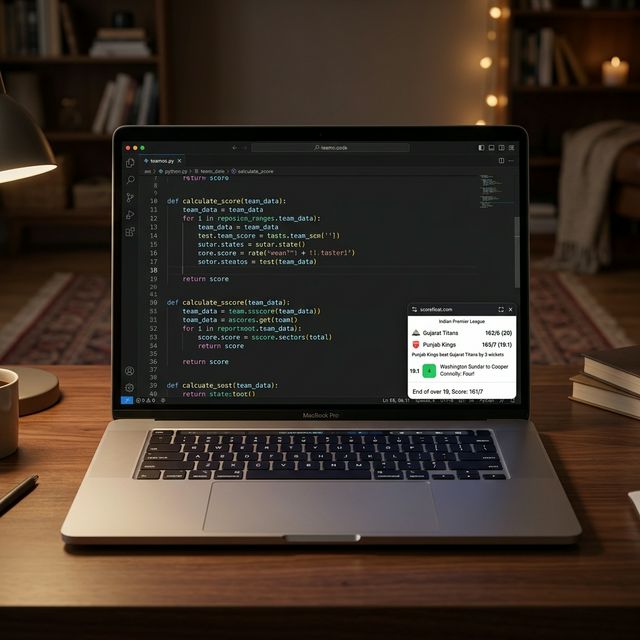 A ScoreFloat live match window (resizable) pinned while coding.
Instead of switching tabs to check the score, imagine a small floating score window pinned to the corner of your screen — always visible, always updated, always on top of whatever else you're working on. You can resize it perfectly and place it anywhere so it never gets in the way. You glance at it like you'd glance at a clock. No clicking, no switching, no losing your place.
That floating window stays on top of Excel. On top of your code editor. On top of Zoom. On top of everything.
It sounds simple. It changes everything.
Introducing ScoreFloat: Built for Exactly This
ScoreFloat is a live cricket score tool built specifically for the working fan.
Every match comes with a Pin Live Score button. Hit it, and your IPL scorecard instantly pops into a floating overlay window that sits above all your other apps. Ball-by-ball updates come in automatically — no refreshing required.
Unlike a browser sidebar (which disappears the moment you switch to another application), ScoreFloat's always-on-top floating window follows you everywhere:
- 💻 Coding in VS Code? Score is there.
- 📹 On a video call? Score is there.
- 📝 Writing a document? Score is there.
- 🍿 Watching something else on the side? Score is still there.
You're not switching tabs. You're not losing context. You're just... working. With the score quietly updating in the corner.
Why a Floating Score Window Beats Every Other Option
Let's be honest about the alternatives:
- Notifications are delayed, vague, and interrupt you at the worst moments. You get a buzz that says "4 runs scored" and suddenly you're unlocking your phone looking for context.
- Score widgets or sidebars are browser-bound. The moment you alt-tab to another application, they're gone. A sidebar in Chrome doesn't follow you to Figma.
- Keeping a score tab open is the classic approach, but it requires discipline you don't have during a last-over chase. One click becomes five minutes.
- A dedicated score app on your phone means picking up your phone — the single most reliable way to lose 20 minutes.
A PiP floating score window on your desktop solves all of these at once. Because it is fully resizable and completely un-intrusive, you place it wherever you want. It's always visible, requires zero interaction, and doesn't pull you away from your primary screen.
How to Pin IPL Live Scores While Working
Getting started takes about 10 seconds:
- Go to scorefloat.com — you land straight on live cricket matches
- Find your IPL match and click Pin Live Score directly on the card
- Your floating score window appears — drag it anywhere on your screen and resize it to fit your workspace
For football or tennis, use the top navigation to switch sports — the same Pin Live Score feature works across all of them.
That's it. Minimise the browser tab if you like. The floating window stays.
Your score is now pinned. Your focus is intact. Your team's fate can unfold without you having to chase it.
The IPL Productivity Trick Nobody Talks About
The most focused cricket fans aren't the ones who close all their score apps during work. They're the ones who stop fighting the urge to check and just make checking effortless.
When glancing at the score costs you nothing — no switch, no click, no context loss — it stops being a distraction. It becomes background awareness, like knowing what the weather is without consciously thinking about it.
A live cricket score overlay on your desktop is less distracting than a second monitor showing Twitter. It's quieter than a group chat blowing up with match reactions. It's far less disruptive than unlocking your phone every six minutes.
It's just the score. Right there. Always on top.
Follow IPL 2026 Without Missing a Delivery — or a Deadline
IPL season is long. The matches are late. The work doesn't stop.
You don't have to choose between being productive and being a cricket fan. You just need a smarter setup.
Pin your first IPL live score now at ScoreFloat →
ScoreFloat supports live scores for IPL, international cricket, football, and tennis. The Picture-in-Picture floating window works on Chrome, Edge, and other Chromium-based browsers on desktop.